Medallion Architecture Explained (Without the Jargon)
Bronze, Silver, Gold — what these layers actually mean, why the structure matters, and how to implement it with a small team and open-source tools.

If you’ve spent any time reading about modern data architecture, you’ve probably come across the term “Medallion architecture.” It shows up in Databricks documentation, data engineering blogs, and conference talks — usually surrounded by enough jargon to make it sound more complicated than it is.
The concept is actually straightforward. Here’s what it means, why it works, and how mid-sized companies can implement it without needing a team of 20 engineers.
What problem does Medallion architecture solve?
Imagine you have five different systems: ERP, CRM, logistics platform, e-commerce, and a few Excel spreadsheets the sales team manages. Each has its own formats, its own naming conventions, its own rules.
In the ERP, the customer “John García” has ID 4521. In the CRM, “J. Garcia” has ID client-00892. In e-commerce, “john.garcia@company.com” is the identifier. They’re the same customer. None of the systems know that.
When someone wants to know how much John García spent in total across all channels, they have to make that cross-reference manually. Multiply that problem by thousands of customers, dozens of metrics, and five systems that change constantly.
Medallion architecture solves this with a layered structure. Each layer has a specific responsibility, and the result is a system where data is reliable, auditable, and useful.
The three layers
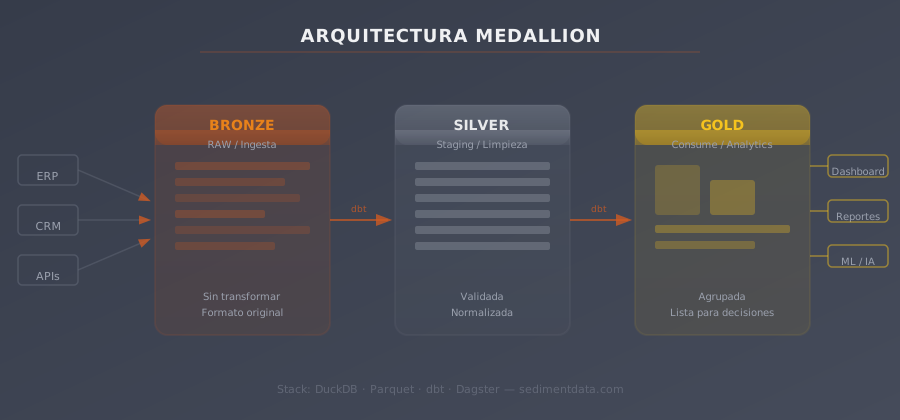
Bronze: the raw archive
The Bronze layer is a faithful copy of every source system, stored in its original structure. The goal here is completeness and fidelity, not cleanliness.
If your ERP exports a CSV with inconsistent date formats, those inconsistencies go into Bronze. If your CRM uses null in one field and an empty string in another, that inconsistency goes into Bronze too.
Why preserve the mess? Because it gives you a complete audit trail. If a number looks wrong six months from now, you can trace it all the way back to the original source record. You can also replay the entire pipeline from scratch if business logic changes and you need to reprocess historical data.
Bronze also acts as a buffer. If a source system changes its format or becomes temporarily unavailable, the historical data is preserved in Bronze and nothing is lost.
What’s in Bronze:
- Replicas of ERP tables, updated daily (or hourly)
- CRM exports
- E-commerce transaction logs
- Excel spreadsheets normalized to a standard format
- Any external API that feeds the business
Typical tool: Parquet files on S3. Files are cheap, permanent, and readable by virtually every data tool.
Silver: the source of truth
The Silver layer is where business logic is applied. This is where:
- Date formats get standardized
- Records that appear in multiple systems get deduplicated
- Consistent naming conventions are applied (same customer ID across CRM and ERP)
- Missing values are filled in according to defined rules
- Records that need manual review are flagged
The critical thing about Silver is that the transformations are code — not spreadsheet formulas, not manual steps, not someone’s tribal knowledge. They’re version-controlled SQL transformations (dbt is the standard tool for this) that can be reviewed, tested, and rolled back.
This is what makes Silver a genuine “source of truth.” Anyone in the organization can look at a Silver table, trace exactly how it was built, and understand where each value came from.
What’s in Silver:
- A unified customer table (with data from all systems)
- A unified product table (consolidating ERP and e-commerce naming)
- Clean transactions cross-referenced with real costs
- Complete history without duplicates
Typical tool: dbt (Data Build Tool) — SQL-based, version-controlled in Git, with built-in data quality tests and automatic documentation.
Gold: ready to use
The Gold layer contains the datasets that business users actually interact with — the tables that power dashboards, reports, and analytical queries.
Gold tables are built with the end user in mind. They’re pre-aggregated where appropriate, they use business terminology instead of system field names, and they’re structured for the specific questions they’re meant to answer.
A Gold table for financial reporting might include pre-calculated gross margin by product line, with exchange rates already applied and revenue recognition rules already enforced. An analyst can query it with simple SQL and get a correct answer — without needing to know anything about how it was built.
What’s in Gold:
- Financial KPIs: P&L, margins, cash flow
- Sales KPIs: revenue by channel, retention, churn
- Operational KPIs: delivery times, return rates
- Dashboards and reports connected directly
Typical tool: DuckDB for queries, Metabase or Power BI for dashboards.
Why this design works better than what most companies do today
Medallion architecture works because it separates responsibilities clearly:
- Bronze is about ingestion (did the data arrive?)
- Silver is about quality (is it correct?)
- Gold is about use (is it useful?)
Each layer can evolve independently. If Silver needs a new cleaning rule, it doesn’t touch Bronze. If Gold needs a new metric, it doesn’t touch Silver or Bronze.
Most importantly: when something fails — and something always eventually fails — you know exactly where to look. If dashboards show a strange number, check Gold first. If the problem is in the data itself, look at Silver. If it’s an ingestion issue, check Bronze.
Without this separation, an error at any point in the chain can propagate silently into reports, without anyone knowing when or where it entered.
A practical stack for mid-sized companies
You don’t need Databricks and a team of senior engineers to implement this. Here’s a stack that works well at the 10 GB–500 GB scale:
| Layer | Tool | Cost |
|---|---|---|
| Ingestion | Python scripts + Airbyte (open source) | $0 |
| Storage | Parquet on S3 | ~$20-100/month |
| Transformations | dbt | $0 |
| Orchestration | Dagster or Airflow | $0 |
| Query engine | DuckDB | $0 |
| BI | Metabase or Superset | $0-50/month |
Total infrastructure cost for a typical 50–200 person company: roughly $100–200/month. Versus $3,000–10,000/month for a comparable managed solution like Snowflake with BI tooling.
How long does implementation take?
Under normal conditions:
- Weeks 1-2: Source connections and Bronze construction
- Weeks 3-4: Silver transformations (cleaning, cross-referencing, deduplication)
- Weeks 5-6: Gold modeling for the first use cases
- Week 7 onwards: Iteration — adding new metrics and new sources
The first concrete result (a dashboard that replaces a manual process) typically appears around week 6.
Common mistakes when implementing
Skipping Bronze: some teams jump straight to a “clean” table without preserving the raw data. This seems efficient until you need to debug something six months later or replay a historical period with different business logic. Always preserve Bronze.
Embedding business logic in dashboards: BI tools should display data, not transform it. If your revenue calculation lives inside a Power BI calculated field, it’s invisible, unversioned, and impossible to test. Business logic belongs in Silver or Gold, not in the visualization layer.
Over-engineering Gold too early: Gold tables should answer specific, well-defined business questions. Building a single “master” Gold table that tries to answer everything usually produces a bloated, slow, hard-to-maintain monster that nobody ends up using.
Not documenting Silver: Silver is the brain of the system. If the conflict resolution rules, deduplication criteria, and metric definitions aren’t documented, the knowledge migrates back to living in people rather than in the system — which is exactly the problem you were solving.
What changes after implementation?
Once the architecture is running, the dynamics of information in the company change:
- The monthly close goes from days to hours
- Decisions are made on verified data, not “what the sales spreadsheet says”
- Ad hoc information requests resolve in minutes, not days
- The team can build new metrics without touching source systems
- Adding a new data source to the stack takes days, not weeks
The Medallion architecture is not a luxury for large enterprises. It’s the foundation that makes a mid-sized company’s data actually useful.
Frequently asked questions
Is Medallion architecture the same as a data warehouse?
Not exactly. A traditional data warehouse applies a rigid schema at write time (schema-on-write). Medallion architecture, as implemented today with Parquet + dbt + DuckDB, preserves raw data in Bronze and applies schema progressively. It’s closer to a Data Lakehouse than a classic warehouse — more flexible, with lower storage costs and no vendor lock-in.
Can I implement Medallion on top of my current ERP?
Yes. The ERP keeps operating exactly as it does today. Bronze is built by extracting data from the ERP via API, scheduled export, or direct database connection. The ERP is just another source, not the destination.
What about data in Google Sheets and Excel?
Both are valid sources. Google Sheets has an API; Excel can be processed with Python scripts. They enter Bronze as normalized files and go through the same Silver cleaning rules as any other source.
Does this architecture scale as the company grows?
Yes. It’s designed to scale incrementally — add new sources to Bronze without touching existing ones, add new transformations to Silver, add new models to Gold. When data volume grows beyond what DuckDB can handle on a single node, the query engine can migrate to Trino or Spark without changing the Parquet files or the dbt code.
If your team is spending too much time fighting with inconsistent data, schedule a call — in 30 minutes we’ll show you what the right architecture looks like for your situation.
Want to implement Medallion architecture in your company? We'll guide you step by step.
Book a 30-minute call, no commitment. We'll tell you how we can help you organize your data infrastructure.
Book a call →