Data Warehouse, Data Lake, or Data Lakehouse: which one actually fits your company
Three architectures that sound similar but solve different problems. An honest guide to choosing the right one based on your scale, team, and data volume.

A technology director at a 200-person manufacturing company reached out to us a few months ago with a direct question: “Do we need a data lake or a data warehouse? Our consulting firm recommended both, but the budget doesn’t cover both.”
The honest answer was: neither. What they needed was a data lakehouse. But to reach that conclusion, you first have to understand what each architecture actually solves, who it was designed for, and when each one makes sense.
Data Warehouse, Data Lake, and Data Lakehouse are three terms that appear in every conversation about data modernization. They’re used interchangeably, confused with each other, and almost always lead to architecture decisions that cost more than necessary or deliver less than expected.
This post is a practical guide to telling them apart — and to avoid paying for an architecture that doesn’t fit your company’s actual scale and needs.
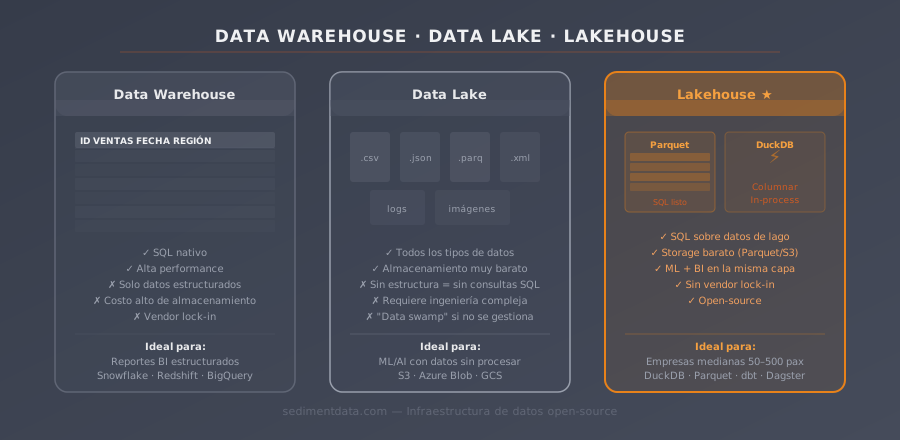
What is a Data Warehouse, and who was it designed for?
A Data Warehouse organizes data before storing it. Everything has a defined schema: typed columns, relationships between tables, validation rules applied at write time. This is called “schema-on-write”: structure is defined before the data goes in.
The result is a system optimized for predictable queries. The Monday morning reports, the finance dashboards refreshed daily, the monthly close numbers — all of it runs fast in a Data Warehouse because the schema is rigid and the queries are known in advance.
The Data Warehouse was built in the 1980s and 90s, when large enterprises (banks, retailers, insurers) needed to consolidate operational data from multiple transactional systems into management reports. It was designed for companies with structured data, well-defined processes, and BI teams that know exactly what questions they’ll ask.
When it makes sense:
- You know exactly what questions you’ll ask your data today and two years from now
- Your BI team works mainly with fixed dashboards and recurring reports
- Data arrives already clean and structured from source systems
- Query speed for many concurrent users is critical
When it doesn’t:
- Your data comes from many sources in different formats
- You need to explore and discover what’s in the data before you can define the reports
- You want to feed machine learning models without standing up another system
- Enterprise licensing costs (Snowflake, Redshift, BigQuery, Synapse) aren’t justified for your scale
The real problem with Data Warehouses: schema rigidity. When the business changes — and it always does — modifying the schema is expensive. It requires planning, engineering work, and in many systems, migrations that involve downtime. Every business change becomes a technical project.
What is a Data Lake, and why does it fail so often?
A Data Lake stores everything as-is: structured, semi-structured, unstructured. JSON from APIs, CSVs from legacy systems, Parquet files from modern pipelines, server logs — everything goes in without transformation. Structure is defined at read time (“schema-on-read”), not at write time.
The promise is appealing: a centralized repository for all company data, ready for analysis whenever it’s needed. You preserve the full historical record, in the original format, without having to decide upfront how you’ll use it.
The problem is that without governance, a Data Lake becomes a data swamp: a chaotic repository where nobody knows what’s in it, where things are, or whether the data is reliable. Gartner estimated that more than 60% of Data Lake projects fail to deliver measurable value. It’s one of the most consistently documented failures in data projects over the last decade.
The Data Lake emerged from the Hadoop/MapReduce ecosystem of large technology companies (Google, Facebook, LinkedIn): organizations with petabyte-scale volumes, data engineering teams of dozens of people, and the capacity to build custom governance on top of the lake.
When it makes sense:
- You’re handling very large data volumes (terabytes to petabytes)
- Your data science team needs access to raw data for experimentation
- You have data from very heterogeneous sources that can’t be normalized on ingestion
- You need to preserve a complete historical record without knowing in advance how you’ll use it
The real risk: a Data Lake without the team and processes to govern it is, in practice, worse than nothing. The data is there, but nobody knows how to use it. For most mid-sized companies, implementing a pure Data Lake means taking on technical and organizational debt they don’t have the capacity to pay.
What is a Data Lakehouse, and why is it the right architecture for most mid-sized companies?
The Data Lakehouse emerged from the exact problem of the Data Lake: it takes the flexibility and low cost of open-format file storage, and adds the structure, governance, and query speed of the Data Warehouse.
Technically: data is stored in open formats (primarily Parquet) in object storage (S3, GCS, Azure Blob). On top of that, a SQL processing layer (DuckDB, Spark, Trino) runs the queries. Transformations are versioned in dbt and orchestration runs in Dagster or Airflow.
What you get:
- Low storage cost — Parquet on disk, no per-GB licensing
- Fast SQL queries without a heavy database server
- Native ML support — Parquet is the format pandas, sklearn, and PyTorch use natively
- Raw data preserved and processed data accessible at the same time
- Schema enforcement without the rigidity of a traditional warehouse
- No vendor lock-in — data is in an open standard that every tool can read
When it fits:
- Multiple data sources in different formats
- You need business reports and exploratory analysis at the same time
- You want to keep the door open to ML without standing up another system
- Small team that needs to maintain everything without operational friction
Direct comparison: what each architecture actually solves
| Data Warehouse | Data Lake | Data Lakehouse | |
|---|---|---|---|
| Licensing cost | High (Snowflake, Redshift) | Low (cloud storage) | Low (open-source + storage) |
| Initial setup | Weeks | Weeks to months | Days to weeks |
| Schema flexibility | Low | High | High |
| Query speed | High | Low without SQL layer | High |
| ML support | Limited | Native (raw data) | Native (Parquet) |
| Vendor lock-in | High | Medium | Low (open standards) |
| Concurrent users | 100+ | Requires additional infra | 10–200 |
| Minimum team size | BI + DBA | Large data engineering team | 1–2 data engineers |
A concrete example: distribution company, 180 employees
An industrial supply distribution company with operations in three countries had the classic problem: data in SAP (finance), Salesforce (sales), a custom logistics system built in PHP, and Excel everywhere.
They evaluated three paths:
With Snowflake: estimated starting price ~$1,500/month. Required normalizing data on ingestion, which meant weeks of modeling work before seeing any results. And with frequent changes to SAP’s data structure, schema maintenance was going to be ongoing and unpredictable.
With a pure Data Lake: low storage cost, but without a dedicated data engineering team to build governance on top, the risk of ending up with a data swamp was real and high. And without a SQL layer, generating business reports required Python scripts that nobody in finance could run independently.
With a Data Lakehouse (DuckDB + Parquet + dbt): estimated ~$80/month in S3 storage. Raw data from all three sources is preserved in Parquet. dbt builds the transformations in standard SQL, versioned in Git. DuckDB executes queries in seconds over 200 GB of data.
They chose the Lakehouse. In three weeks they had the first reports running. In six weeks, the monthly close went from five days to four hours. The total implementation cost was recovered in the second month of operation through time savings in the finance team.
How do you migrate from a Data Warehouse to a Lakehouse?
The most common question after reading comparisons like this one: “We’re on Snowflake and want to move. How hard is it?”
The answer depends on how much lock-in has accumulated, but the process generally has three phases:
Phase 1 — Export and replicate (weeks 1–2): export all Snowflake tables to Parquet in S3. It’s not technically complex, but it requires validating that the export is complete and that data types are preserved correctly.
Phase 2 — Port transformations to dbt (weeks 2–6): transformations built in Snowflake — stored procedures, Snowpipe jobs, Tasks — need to be rewritten in dbt with standard SQL. The difficulty depends on how many proprietary features were in use. Standard SQL joins and aggregations migrate directly; platform-specific functions require case-by-case rewriting.
Phase 3 — Reconnect BI tools (weeks 4–8): dashboards in Power BI, Tableau, or Metabase need to be reconnected. Most tools support DuckDB via ODBC or have native connectors. In most cases this means changing the connection string, not rebuilding the dashboards.
For most mid-sized companies, a full migration takes 6 to 12 weeks. Licensing savings typically cover the migration cost within the first 3–4 months.
How to choose without making a costly mistake
One simple question to orient yourself:
Do you already know exactly what questions you’ll ask your data, or are you still figuring out what you have?
If you know exactly what you need and data arrives clean → a Data Warehouse might be the right answer.
If you’re sorting through chaos, connecting heterogeneous sources, and need flexibility to grow → a Data Lakehouse is the right starting point.
If you’re Netflix or Uber with a team of 50 data engineers → you have different problems this post doesn’t cover.
The most common mistake: choosing the architecture before understanding the problem. Most failed implementations don’t fail because of technology — they fail because someone chose an architecture for the business they want to be, not the one they are today.
The lightweight implementation nobody talks about
A Lakehouse doesn’t require enterprise platforms or a corporate budget. For most mid-sized companies, the right architecture is:
- DuckDB as a columnar SQL query engine — analyzes terabytes without costly infrastructure
- Parquet as the storage format — portable, efficient, compatible with any ML tool
- dbt for versioned and documented transformations in standard SQL
- Dagster to automate when and how each pipeline step runs
The architecture has three layers: raw data as it arrives (Bronze), clean and validated data (Silver), data ready for analysis (Gold). No heavy database servers. No per-GB licensing. No vendor lock-in.
You can read the full explanation of this architecture in Medallion Architecture Explained.
Frequently asked questions
Is a Data Lakehouse harder to maintain than Snowflake?
Snowflake simplifies operations by eliminating infrastructure management, but at the cost of significant monthly spend and progressive vendor lock-in. A well-configured Lakehouse requires technical knowledge upfront — connecting sources, modeling transformations, configuring the pipeline — but day-to-day maintenance is minimal. For teams with at least one technical profile, the trade-off favors the Lakehouse.
Can I start with a Lakehouse and scale later if I need to?
Yes, and it’s the recommended path. A DuckDB + Parquet Lakehouse comfortably handles up to 1–5 terabytes on a single server. If you eventually need more scale or concurrent users, migrating to Spark or a managed warehouse is much easier when data is already in Parquet than when it’s in a proprietary format.
How much does it cost to implement a Lakehouse from scratch?
There’s an upfront engineering cost: connecting data sources, modeling transformations, configuring the pipeline. The recurring cost is storage: for companies with 50–500 employees, typically between $20 and $150/month on S3 depending on volume. No software licensing fees.
Does a Data Lakehouse replace Excel?
No. Excel remains useful for ad hoc analysis, individual work, and presentations. What the Lakehouse replaces are the critical reports that currently live in shared spreadsheets, manual data cross-referencing between systems, and monthly closes that depend on one specific person running macros in the right order.
Do I need a full-time data engineer to maintain a Lakehouse?
Not necessarily. A well-configured Lakehouse can be maintained by someone with SQL skills and some Python. The key is that transformations are in dbt (standard SQL, versioned, documented) and the pipeline is in Dagster (with clear logs and configurable alerts). The business team can work with data from the Gold layer without touching the infrastructure.
If this post was useful, also read what a data lake actually is and why vendor lock-in is the cost nobody calculates.
Schedule a call. In 30 minutes we’ll tell you which architecture makes sense for your company today.
Not sure which architecture fits your company? We'll tell you in 30 minutes.
Book a 30-minute call, no commitment. We'll tell you how we can help you organize your data infrastructure.
Book a call →